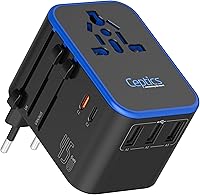
How to Choose a Travel Power Strip for a Cruise Ship
The best travel power strip for a cruise ship is one that your cruise line allows, fits the cabin outlet, and gives you the ports you need without unsafe features. Check the line's current equipment rules before packing it.
On this page (9 sections)
- What should you check before bringing a travel power strip on a cruise ship?
- Is surge protection allowed on a cruise ship?
- How many ports do you need in a cruise cabin?
- Do you need a voltage converter or only a plug adapter?
- Which compact products can help with cruise charging?
- How should you compare a cruise power strip's size and layout?
- Can you use a cruise power strip for hair tools?
- What is the best way to pack and use one?
- Which travel power strip should you choose for a cruise ship?
The best travel power strip for a cruise ship is an approved, compact device with enough USB and AC connections for your cabin routine. Before choosing one, check your cruise line's current rules because ships may restrict surge protectors, extension cords, power strips or devices with heating elements.
A cruise cabin often has fewer outlets than a home office. You may need power for a phone, a watch, a camera battery, an e-reader and a laptop in the same small space.
That pressure makes a multi-outlet device tempting, even when the ship does not allow it.
The outlet type matters as much as the port count. A device that fits one outlet may block another socket or sit at an awkward angle behind furniture.
Measure the space near the desk and bed before you assume a shape will work.
Voltage needs add another layer to the decision. Some chargers accept a wide range of input, while others need a specific output.
A plug adapter alone will not solve a voltage mismatch.
Size also affects daily use in a cabin. A large unit can make cables messy and hard to reach at night.
A smaller unit keeps the area tidier, but only if the ports stay open after each charger is connected.
Think about your routine on board, not just your packing list. You may charge a phone overnight and a camera battery during the day.
A power bank may help during shore time, but it does not replace a cabin outlet.
Cruise rules should come before product features. A device with many ports is not useful if it will be stored at embarkation.
Check the current policy for your exact sailing, since rules can differ by ship and by cruise line.
If you also need help choosing a general travel charger, compare its ports and voltage needs with the more specific rules for cruise travel.
Bring only what matches the policy and your devices. That simple order saves money, space and hassle at the dock.
It also keeps your cabin routine calm from the first night on board.
What should you check before bringing a travel power strip on a cruise ship?
Check the cruise line's prohibited-items page first, then match the device to the allowed features. The cruise line's current policy is the deciding factor, not the number of outlets or the device's travel label.
Look for rules about:
- Surge protection
- Extension cords
- Multi-outlet power strips
- Heating appliances
- Maximum wattage
- USB-only chargers
- Power banks
- Confiscation or storage of restricted items
Start with the official page for your cruise line. Search for terms such as power strip, surge protector, extension cord and adapter.
Read the full item description, not just a short summary.
Note any wording about confiscation or storage. Some lines may hold a restricted item until the end of the cruise.
Others may refuse it at security or ask you to leave it behind.
Check whether the rule mentions USB-only chargers. A small charger with USB ports may be treated differently from a strip with AC outlets.
The number of ports can also affect how an item is classified.
Look for a maximum wattage or a list of banned appliances. Heating appliances often face stricter limits than chargers.
A device that heats, even at a low setting, may fall into that group.
Save the policy page or take a screenshot before packing. Keep a copy on your phone so you can check the exact wording during preparation.
That record helps if a policy changes between booking and sailing.
Policies can vary by cruise line and may change. Do not rely on a friend's experience from a different ship.
A rule that applied last year may not apply to your current trip.
A simple USB charger may be treated differently from a power strip with AC outlets. A universal adapter may also have different rules from a converter, so identify what the device actually does.
Match each feature to the policy in plain terms. If the rule allows USB hubs, choose a USB-focused option.
If it allows only non-surge strips, remove surge protection from your shortlist.
Check the outlet type after you check the rules. Even an allowed device must fit the cabin outlet without strain.
Confirm that its plugs and cables suit the space you have.
Recheck the policy close to departure. A quick review takes little time and can prevent a problem at embarkation.
When in doubt, ask the cruise line directly and keep their reply.
Is surge protection allowed on a cruise ship?
Surge protection is not automatically safe or permitted on a cruise ship. Some cruise lines restrict surge-protected power strips, so do not choose a model with surge protection unless the current policy clearly allows it.
The same caution applies to devices marketed for home use. A product can protect electronics in one setting and still be prohibited in a ship cabin.
Home use and ship use follow different rules.
Surge protection is designed to respond to voltage spikes. A cruise cabin has a different electrical setup from a home outlet.
That difference is one reason a line may limit this feature.
Do not assume a surge label is harmless because the device is small. Size does not change its electrical function.
The policy usually cares about the feature, not the product name.
Read the prohibited-items page for clear wording. Look for surge protector, surge protection and power strip in the same section.
Check whether the rule bans the feature or only certain models.
If the cruise line permits only non-surge power strips, choose a basic model that meets that description. A plain strip has outlets without the added protection circuit.
That match matters more than extra features.
If the policy allows USB charging hubs but not multi-outlet strips, a USB-focused option may fit the rule better. USB ports can charge many small devices without adding AC outlets.
This can also keep the unit smaller.
Avoid a converter or adapter with built-in surge features unless the policy allows them. The same rule can apply across product types.
Extra protection features do not make a restricted device acceptable.
Our guide to the best travel power strips with USB ports can help you compare port layouts, but you still need to confirm cruise approval.
Compare port direction and spacing after you confirm approval. Top ports are easier to reach than side ports in a narrow space.
Short cables also reduce clutter near the bed.
Do not place any strip under bedding or inside luggage. Keep it visible, dry and uncovered while in use.
Disconnect it when you leave the cabin if the cruise line recommends that practice.
When the policy is unclear, choose the simpler approved option. Fewer special features usually means fewer questions at embarkation.
A basic charger that is allowed beats a complex strip that is not.
How many ports do you need in a cruise cabin?
Choose the number of ports by counting the devices you charge at the same time. Most travelers should first count USB devices, then decide whether they need an AC outlet for a laptop or other charger.
A useful cabin count might include:
- Phone
- Smartwatch
- E-reader
- Camera battery charger
- Tablet
- Laptop
- Portable power bank
Count only the items you truly need at once. A phone and a watch may charge overnight, while a camera battery may charge during the day.
That timing can reduce the total number of ports you need.
USB ports can reduce the need for separate wall chargers. Each USB port can replace a bulky plug for a small device.
This helps when the cabin has only one or two wall outlets.
AC outlets remain useful for devices with larger plugs, but they may make the unit bulkier and may fall under stricter cruise rules. A laptop charger often needs an AC outlet unless you have a USB-C setup that works for your needs.
Check what each device uses before you decide. A tablet may charge by USB, while a laptop may need its own brick.
A camera charger may have a wall plug or a USB cable, depending on the model.
Think about cable length and reach. Short cables work well at a desk, but a bedside outlet may need a longer run.
A port layout that faces the wrong way can make even a short cable hard to use.
A compact layout also matters. Ports on the top or front can be easier to reach than ports hidden behind a large adapter.
Side ports may be blocked by a wall or by furniture.
Leave space for plugs that are wider than average. Large chargers can cover nearby ports and make them unusable.
A design with gaps between ports gives each charger more room.
Consider charging speed in daily use. Some USB ports suit a phone well, while a tablet may need more power.
Match the port type to the device instead of counting ports alone.
A power bank can spread charging across the day. It may charge a phone during shore time and reduce demand on the cabin outlet at night.
It does not add AC outlets, so plan for that limit.
Pack the device where you can reach it during inspection. Keep its labels visible and its cord untangled.
A clear cabin setup makes nightly charging faster and safer.
Do you need a voltage converter or only a plug adapter?
You need a converter only when a device cannot accept the ship's voltage. A plug adapter changes the shape of the connection, while a voltage converter changes electrical output.
Check the label on each device. Chargers marked 100-240V, 50/60Hz generally do not need a step-down converter when used with a compatible outlet, but the cruise line's outlet type and policy still matter.
The FOVAL Power Step Down 220V to 110V has a 230W converter, 2 AC outlets and 4 USB charging ports. It steps voltage down to 110V and is intended for equipment under 230W, so it suits travelers whose specific device needs 110V output and who have confirmed that a converter is permitted.
Do not use a converter for a device that exceeds its stated limit. FOVAL also warns against using this converter for hair dryers and electric heaters.
For trips that include shore stops, our guide to a travel power strip for Italy explains why plug shape and voltage are separate decisions.
Which compact products can help with cruise charging?
The best choice depends on whether you need AC conversion, plug compatibility or backup battery power. These 3 products solve different charging problems, so none should be treated as a universal answer for every cruise cabin.
The EPICKA Universal Travel Adapter has 1 AC socket, 3 USB-C ports and 2 USB-A ports. It includes plugs for EU, US, UK and Australia, supports charging up to 6 devices, and does not convert voltage.
EPICKA includes a replaceable 10A fuse and 1 spare fuse. The adapter is not intended to replace a voltage converter, and its AC socket may not suit high-power appliances such as hair dryers, curling irons or straighteners.
Its 2.9 x 2.07 x 2.15 in size and 5.1 oz weight make it easier to pack than a larger converter. However, its universal plug system does not make it automatically acceptable on a cruise ship.
The BLAVOR Solar Power Bank is a different type of backup. It has a 10,000mAh capacity, USB-C output with 20W charging, wireless charging, built-in cables and support for charging 3 devices at the same time.
BLAVOR says the solar panel is best treated as a backup because its maximum solar charging current is 0.23A. Its 5.9 x 3.1 x 0.8 in size and 9.3 oz weight make it useful when you need power during shore time, but it does not add AC outlets in the cabin.
See our comparison of the best compact travel power strips if packing space is your main concern. For international plug needs, compare the best travel adapter power strip options as well.
How should you compare a cruise power strip's size and layout?
Choose a device that fits the cabin outlet area without blocking nearby sockets. A smaller body is useful only if its ports remain reachable after you connect your chargers.
Check these details before packing:
- Overall length, width and thickness
- Cable length
- Port direction
- Plug size
- Whether large chargers block neighboring outlets
- Where the device can rest safely
- Whether the cord can reach the bed or desk
The FOVAL converter measures 4.82 x 3.13 x 1.47 in and has a detachable 5 ft power cable. The EPICKA adapter measures 2.9 x 2.07 x 2.15 in.
The BLAVOR power bank measures 5.9 x 3.1 x 0.8 in.
Do not place a converter or power strip under bedding, inside luggage while charging or where it can be covered by clothing. Keep cords visible and avoid routing them across walking paths.
Can you use a cruise power strip for hair tools?
You should use a hair tool only when its voltage and wattage match the converter and the cruise line allows that equipment. High-power heating devices create a different risk from charging phones and cameras.
FOVAL supports equipment under 230W and specifically warns against hair dryers and electric heaters. EPICKA is not a voltage converter and may not suit high-power appliances such as hair dryers, curling irons and straighteners.
Check the wattage label on the appliance and the output limits of the device you plan to use. If the numbers do not match, leave the appliance at home or use the ship's approved alternative.
For ordinary cabin charging, phones, tablets, cameras and power banks are easier to match than heating tools. Keep the use case narrow instead of assuming a travel power strip can run every appliance.
What is the best way to pack and use one?
Pack the device where you can reach it during inspection or boarding, and keep its labels visible. Bring only equipment that matches the cruise line's current policy and your devices' electrical requirements.
Before departure:
- Check the cruise line's prohibited-items policy.
- Count the devices you expect to charge together.
- Read each charger's voltage input.
- Confirm whether you need a converter or only a plug adapter.
- Check the device's wattage limit.
- Inspect the cord, plug and housing for damage.
- Pack any required adapter or fuse safely.
At the cabin, connect the approved device directly to the outlet. Keep the unit dry, uncovered and away from heat.
Disconnect it when you leave if the cruise line's guidance recommends that practice.
A power bank can reduce demand on the cabin outlet, but charge it according to its instructions and keep it where you can monitor it. BLAVOR's solar input is intended as a backup, while cable charging is the more practical primary method.
Which travel power strip should you choose for a cruise ship?
Choose the FOVAL converter only when you need 110V output, your equipment stays under 230W and the cruise line permits that type of device. Choose the EPICKA adapter when you need several USB ports and international plug options without voltage conversion.
Choose the BLAVOR power bank when backup battery power matters more than adding cabin outlets. If the cruise line restricts power strips or adapters, use the approved charging method instead of trying to disguise a restricted device as a charger.
The safest decision rule is simple: check the cruise policy first, match the device to your voltage needs second, then choose the smallest approved option with enough ports. For surge-protection questions, compare the best travel power strips with surge protection only after confirming that feature is allowed on your ship.
Frequently asked questions
Can you bring a travel power strip on a cruise ship?
Some cruise lines allow simple, non-surge-protected power strips, while others restrict power strips, extension cords or multi-outlet devices. Check your cruise line's current prohibited-items policy before packing one, and follow the line's rule even if the device is allowed on another ship.
Should a cruise ship power strip have surge protection?
Do not assume surge protection is allowed on a cruise ship. Many cruise lines restrict surge-protected power strips because of the ship's electrical system, so check the current policy and choose an approved non-surge option when required.
Do I need a voltage converter on a cruise ship?
You need a voltage converter only when your device does not support the ship's supplied voltage. Check each charger's input label for a range such as 100-240V, then compare it with the ship's outlet and the cruise line's guidance before bringing a converter.
Is a universal travel adapter the same as a power strip?
No. A universal travel adapter changes the plug shape, while a power strip adds outlets.
Some travel adapters include several USB ports and one AC socket, but they do not automatically convert voltage or make a cruise line's restricted device acceptable.